
Transit Scheduling 101: Building A Timetable ⌛
How to build a timetable, without the need for specialized scheduling software in this installment of Transit Scheduling 101!

Welcome back to Transit Scheduling 101. I hope you’ve found the series informative and engaging so far. Over the next two articles, we’re going to:
build timetables at several frequencies for the Raytown route developed in the Developing a Runtime installment of this series
block the timetables into driver schedules
Both of those tasks are more easily demonstrated than written out, so jump to the end for a demonstration video. However, before the demonstration, some context.
At many transit authorities, particularly larger ones, scheduling is done in specialized software, with Trapeze and Hastus being two of the dominant players. These tools are great for streamlining the scheduling workflow and making more complicated schedules possible. However, similar to how a transit agency rarely starts with a 60’ articulated bus, if you only operate a handful of routes, the time and energy required to procure a scheduling software, and the learning curve associated with working in one might not be worth the squeeze. As long as timetables remain simple and straightforward, spreadsheet based software like Microsoft Excel or Google Sheets are perfectly valid tools for developing timetables.
Even when I have access to transit scheduling software, I often still sketch out schedules in Excel to help me input them into the software. Additionally, before building a schedule in any platform, I always double check the scheduling math of the service I’m developing to understand how many vehicles the schedule should require.
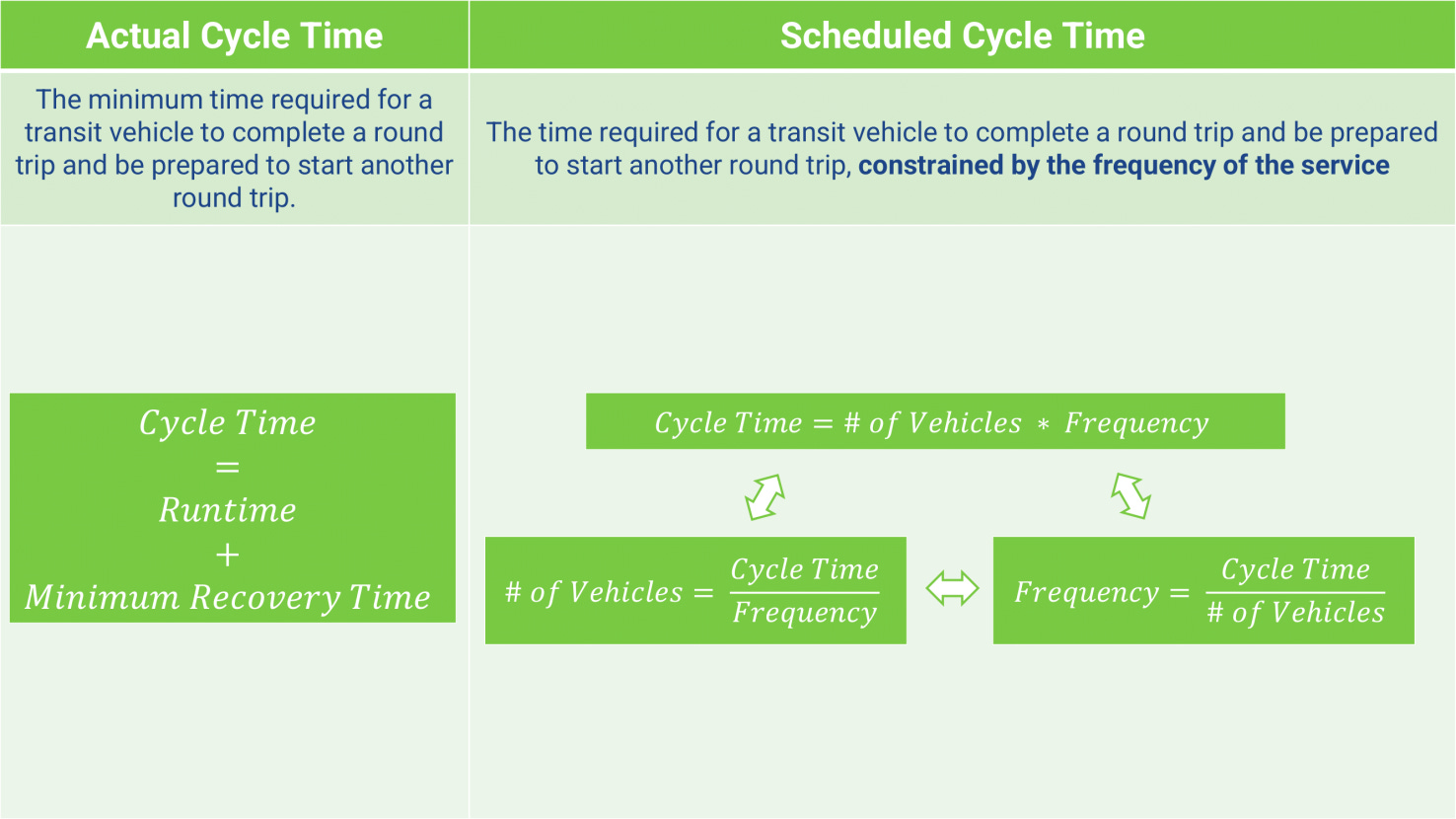
That way, if I block the schedule and find it takes more vehicles than the scheduling math suggests, I know I probably goofed and should doublecheck my work. Remember, scheduling software is only as powerful as the scheduler using it. If you feed the software an inefficient trip schedule, it’ll take your word at face value and build a timetable that aligns with the trip schedule you provided.
Lastly, scheduling is equal parts art and science. If you separated two schedulers and asked each to build a timetable for a route that comes every 30 minutes and runs all day, they would each probably produce a slightly different timetable. Every scheduler has a unique approach and set of assumptions they follow when developing a timetable. Here are a few general rules I try to follow when I’m in charge of developing a timetable:
Start with clean departures from the beginning of the trip. For example, if a service starts at 5am and runs every half hour, trips would start at the top of the hour and half past the hour for the entire timetable
Completely build out one direction of a timetable before starting on the other direction. This saves me from chasing my tail as I develop the timetable.
Build the core schedule, and add additional frequency in the gaps. For example, if a service runs hourly on weekends, and half hourly on weekdays, the weekday timetable should be built on the “frame” of the weekend schedule, with additional trips between the weekend trips to bring the service up to the desired frequency. This allows someone relying on the service on weekdays and weekends to plan their travel around consistent trips across all day types
Generally, when assigning layover, split the layover evenly between the two ends of the route. Modify this rule as necessary if one end of the route is more conducive to layovers than the other end
For reference:
Excel TIME function documentation
Now, with all of that out of the way, let’s start building a timetable for the 64 Raytown. Here’s a link to download the excel sheet I’m using in the demonstration video if you want to follow along! Stay tuned for the next installment, where we’ll block the schedules we’ve built.
📚 Buy me a Book 💚
Thanks for reading! If you enjoy my writing and want to support it in a small but meaningful way, consider buying me a book from my Bookshop.org wishlist. It’s the books that I want to read, but have not quite pulled the trigger yet!